
How to add a custom column in order grid in Magento 2
In this post, we are going to see how we can add a custom column in order grid in Magento 2. We are going to create one custom module which will use ui_component to add a custom column in order grid. This custom column will render a data from a custom database table using JOIN. We will highlight only the important file, not the whole module.
Getting Started: Development
Step 1: Create module.xml file under app/code/Codextblog/Ordercolumn/etc directory and registration.php file under app/code/Codextblog/Ordercolumn directory.
Step 2: Create sales_order_grid.xml file under app/code/Codextblog/Ordercolumn/view/adminhtml/ui_component directory with below code
<listing xmlns:xsi="http://www.w3.org/2001/XMLSchema-instance" xsi:noNamespaceSchemaLocation="urn:magento:module:Magento_Ui:etc/ui_configuration.xsd">
    <columns name="sales_order_columns">
        <column name="short_name" class="Codextblog\Ordercolumn\Ui\Component\Listing\Column\Mycolumn">
            <argument name="data" xsi:type="array">
                <item name="config" xsi:type="array">
                    <item name="filter" xsi:type="string">text</item>
                    <item name="label" xsi:type="string" translate="true">My Column</item>
                </item>
            </argument>
        </column>
    </columns>
</listing>
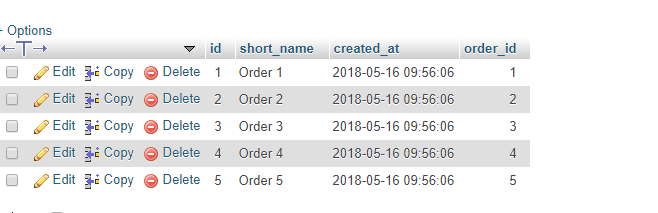
In this code, we have added our custom column named ‘short_name’. This column is defined in our custom module database table ‘custom_order’ which looks like this.
Step 3: Create Mycolumn.php ui component class file under app/code/Codextblog/Ordercolumn/Ui/Component/Listing/Column directory with below code
<?php
namespace Codextblog\Ordercolumn\Ui\Component\Listing\Column;

use \Magento\Sales\Api\OrderRepositoryInterface;
use \Magento\Framework\View\Element\UiComponent\ContextInterface;
use \Magento\Framework\View\Element\UiComponentFactory;
use \Magento\Ui\Component\Listing\Columns\Column;
use \Magento\Framework\Api\SearchCriteriaBuilder;
use \Codextblog\Ordercolumn\Model\CustomFactory;

class Mycolumn extends Column
{

    protected $_orderRepository;
    protected $_searchCriteria;
    protected $_customfactory;

    public function __construct(
        ContextInterface $context,
        UiComponentFactory $uiComponentFactory,
        OrderRepositoryInterface $orderRepository,
        SearchCriteriaBuilder $criteria,
        CustomFactory $customFactory,
        array $components = [], array $data = [])
    {
        $this->_orderRepository = $orderRepository;
        $this->_searchCriteria  = $criteria;
        $this->_customfactory = $customFactory;
        parent::__construct($context, $uiComponentFactory, $components, $data);
    }

    public function prepareDataSource(array $dataSource)
    {
        if (isset($dataSource['data']['items'])) {
            foreach ($dataSource['data']['items'] as & $item) {
                $order  = $this->_orderRepository->get($item["entity_id"]);

                $order_id = $order->getEntityId();

                $collection = $this->_customfactory->create()->getCollection();
                $collection->addFieldToFilter('order_id',$order_id);

                $data = $collection->getFirstItem();


                $item[$this->getData('name')] = $data->getShortName();
            }
        }
        return $dataSource;
    }
}
In this code \Codextblog\Ordercolumn\Model\CustomFactory is the module in which we have stored the order id in a custom database table.
In prepareDataSource function, we get the current order id. Using this order id we are querying our custom module database table to fetch the appropriate short_name.
After following above steps you will get your custom column added in the order grid.
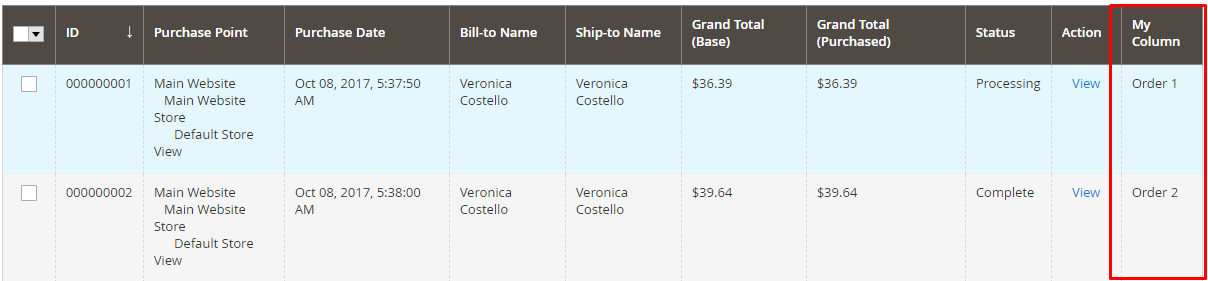
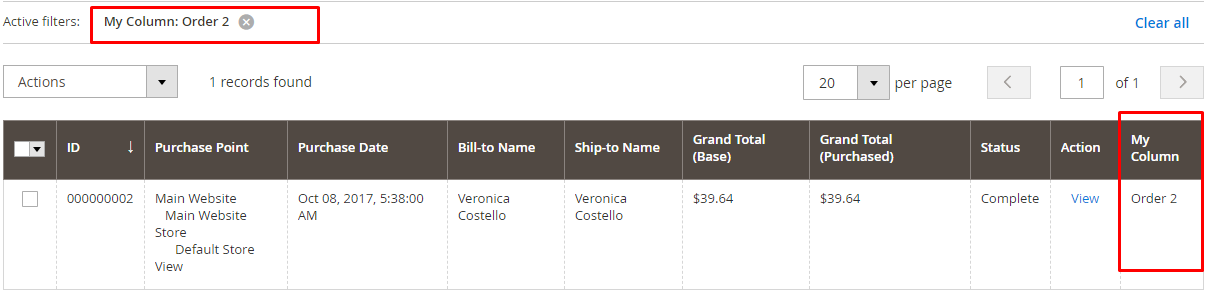
Now if you filter the text in your custom column it will not work. To make it work we need to create a plugin which will filter the custom column using JOIN between ‘sales_order_grid’ and custom database table ‘custom_order’.
Step 4: Create di.xml file under app/code/Codextblog/Ordercolumn/etc/adminhtml directory with below code.
<config xmlns:xsi="http://www.w3.org/2001/XMLSchema-instance"
        xsi:noNamespaceSchemaLocation="urn:magento:framework:ObjectManager/etc/config.xsd">
    <type name="Magento\Framework\View\Element\UiComponent\DataProvider\Reporting">
        <plugin name="sales_grid_collection" type="\Codextblog\Ordercolumn\Model\Plugin\Sales\Order\Grid"/>
    </type>
</config>
Step 5: Create plugin model file Grid.php under app/code/Codextblog/Ordercolumn/Model/Plugin/Sales/Order directory with below code.
<?php
namespace Codextblog\Ordercolumn\Model\Plugin\Sales\Order;


class Grid
{

    public static $table = 'sales_order_grid';
    public static $leftJoinTable = 'custom_order';

    public function afterSearch($intercepter, $collection)
    {
        if ($collection->getMainTable() === $collection->getConnection()->getTableName(self::$table)) {

            $leftJoinTableName = $collection->getConnection()->getTableName(self::$leftJoinTable);

            $collection
                ->getSelect()
                ->joinLeft(
                    ['co'=>$leftJoinTableName],
                    "co.order_id = main_table.entity_id",
                    [
                        'short_name' => 'co.short_name'
                    ]
                );

            $where = $collection->getSelect()->getPart(\Magento\Framework\DB\Select::WHERE);

            $collection->getSelect()->setPart(\Magento\Framework\DB\Select::WHERE, $where);

            //echo $collection->getSelect()->__toString();die;


        }
        return $collection;


    }


}
We have left joined two tables on ‘sales_flat_order’ table ‘entity_id’ and ‘custom_order’ table ‘order_id’. Once we applied this code our filter is started working.
If this post helps you, then please like us on Facebook and follow us on Twitter.